> ## Documentation Index
> Fetch the complete documentation index at: https://docs.summation.com/llms.txt
> Use this file to discover all available pages before exploring further.
# Applications
> Purpose-built apps deployed into your workspace, launched from one place.
**Applications** — also known as **SumApps** — are purpose-built apps deployed into your workspace, like a planning surface or a marketing-performance review. Each runs at its own address and opens in a new tab. The **Applications** page is the launcher: it lists every app deployed for your workspace in this environment, with nothing to configure.
Applications are deployed and registered through a **deploy pipeline**, not built in the app. Registering, updating, and removing them is done over the [API](#register-an-application); the page you see is the read-only front door.
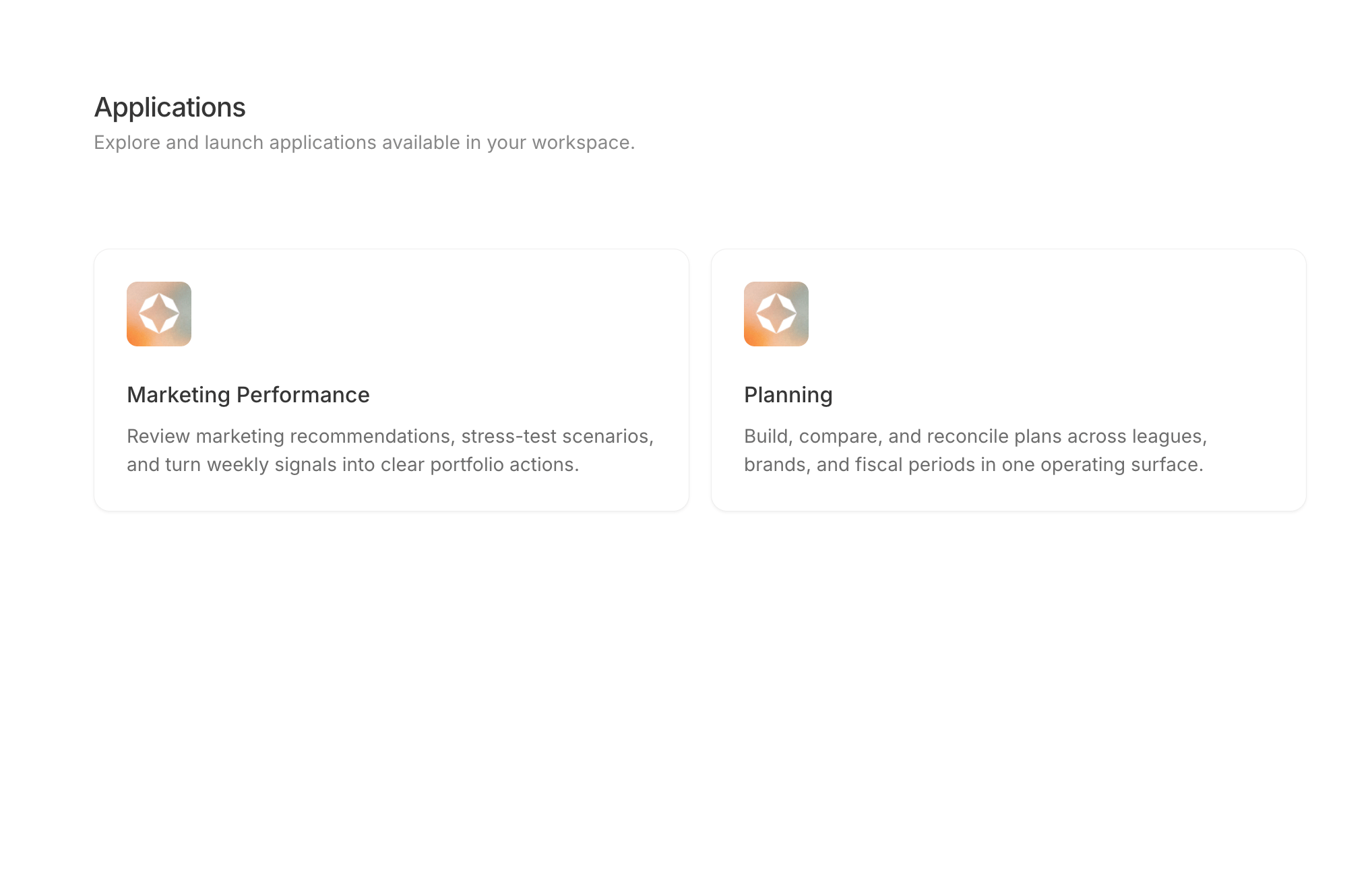 **Where each action lives in the UI** (for telling users where to click):
* **Applications home**: the **Applications** entry in the left nav sidebar (`/apps`) — a grid of cards, each showing an icon, title, and description. Clicking one **opens the app in a new tab** at its own URL on the tenant app host; nothing opens inside the web app.
* **There is no create, edit, or delete UI.** The launcher is read-only. Cards appear because a deploy pipeline registered them via `POST /v1/sum-apps`, and disappear when something deregisters them.
* **"Application" and "SumApp" are the same object** — the product name and the internal/API name. Code, protobufs, and the `SumApps` API tag all say SumApp; the UI says Applications. The registry lives in app-data-service; the web app reads it through tRPC (`sumApps.list`) and renders it verbatim, so *registered* means *deployed* for the environment you're looking at.
* **An empty page means nothing is registered in this environment**, not an error — each environment's registry holds only its own registrations, so shared and local deployments usually list nothing.
* Card **art is frontend-owned and keyed by slug** (e.g. `planning`, `sdr-roi`); a slug with no matching image falls back to a default. Title, description, and URL always come from the registry.
The Applications nav entry and `/apps` are gated by the `ui_applications_home_v1` feature flag; with it off, `/apps` redirects to `/home`.
## Find and launch applications
Open **Applications** (`/apps`) in the left sidebar and click a card. The app opens in a new tab at its own address — it runs alongside Summation rather than inside it, so your place in the workspace is kept.
The list is the workspace's live registry: an app appears as soon as it's deployed and registered, and its title and description update in place on the next deploy.
List the applications deployed for this workspace. Requires the `agent:read` scope.
## What a registration holds
Each application is one registry entry, keyed by **slug**:
| Field | What it is |
| ----------------- | ----------------------------------------------------- |
| **`app`** | The app's manifest id — e.g. `self-driving-roi` |
| **`slug`** | Its mount slug, unique per workspace — e.g. `sdr-roi` |
| **`title`** | The launcher card's title |
| **`description`** | The launcher card's description |
| **`path`** | The mount path — e.g. `/p/sdr-roi/` |
| **`url`** | The full URL the card opens, on the tenant app host |
## Register an application
Register and configure an application from the Applications page. For now, registration happens through the deploy pipeline — see **Via the API**.
Register a deployed application, or refresh one that already exists. Requires the `tables:append` scope.
Registration is an **upsert keyed by slug**: a redeploy under the same slug refreshes the title, description, and URL in place rather than adding a second card. Deploy pipelines call this after a successful deploy, so the launcher always reflects what's actually running.
## Remove an application
Remove an application from the launcher in the app. For now, deregistration happens through the API.
Deregister an application so it stops appearing in the launcher. Requires the `tables:append` scope and `confirm=true`.
The call is **idempotent** — deregistering a slug that isn't registered reports `removed: false` instead of failing, so deploy-tooling retries are safe. Deregistering removes the launcher entry; it doesn't tear down the deployment behind it.
**Where each action lives in the UI** (for telling users where to click):
* **Applications home**: the **Applications** entry in the left nav sidebar (`/apps`) — a grid of cards, each showing an icon, title, and description. Clicking one **opens the app in a new tab** at its own URL on the tenant app host; nothing opens inside the web app.
* **There is no create, edit, or delete UI.** The launcher is read-only. Cards appear because a deploy pipeline registered them via `POST /v1/sum-apps`, and disappear when something deregisters them.
* **"Application" and "SumApp" are the same object** — the product name and the internal/API name. Code, protobufs, and the `SumApps` API tag all say SumApp; the UI says Applications. The registry lives in app-data-service; the web app reads it through tRPC (`sumApps.list`) and renders it verbatim, so *registered* means *deployed* for the environment you're looking at.
* **An empty page means nothing is registered in this environment**, not an error — each environment's registry holds only its own registrations, so shared and local deployments usually list nothing.
* Card **art is frontend-owned and keyed by slug** (e.g. `planning`, `sdr-roi`); a slug with no matching image falls back to a default. Title, description, and URL always come from the registry.
The Applications nav entry and `/apps` are gated by the `ui_applications_home_v1` feature flag; with it off, `/apps` redirects to `/home`.
## Find and launch applications
Open **Applications** (`/apps`) in the left sidebar and click a card. The app opens in a new tab at its own address — it runs alongside Summation rather than inside it, so your place in the workspace is kept.
The list is the workspace's live registry: an app appears as soon as it's deployed and registered, and its title and description update in place on the next deploy.
List the applications deployed for this workspace. Requires the `agent:read` scope.
## What a registration holds
Each application is one registry entry, keyed by **slug**:
| Field | What it is |
| ----------------- | ----------------------------------------------------- |
| **`app`** | The app's manifest id — e.g. `self-driving-roi` |
| **`slug`** | Its mount slug, unique per workspace — e.g. `sdr-roi` |
| **`title`** | The launcher card's title |
| **`description`** | The launcher card's description |
| **`path`** | The mount path — e.g. `/p/sdr-roi/` |
| **`url`** | The full URL the card opens, on the tenant app host |
## Register an application
Register and configure an application from the Applications page. For now, registration happens through the deploy pipeline — see **Via the API**.
Register a deployed application, or refresh one that already exists. Requires the `tables:append` scope.
Registration is an **upsert keyed by slug**: a redeploy under the same slug refreshes the title, description, and URL in place rather than adding a second card. Deploy pipelines call this after a successful deploy, so the launcher always reflects what's actually running.
## Remove an application
Remove an application from the launcher in the app. For now, deregistration happens through the API.
Deregister an application so it stops appearing in the launcher. Requires the `tables:append` scope and `confirm=true`.
The call is **idempotent** — deregistering a slug that isn't registered reports `removed: false` instead of failing, so deploy-tooling retries are safe. Deregistering removes the launcher entry; it doesn't tear down the deployment behind it.