
When to use it
The monthly review is where a company decides what it believes about itself. It’s also a week of somebody’s month. Reconcile the scorecard, chase the variances, get the membership or subscription numbers to agree with finance, rewrite the forward view because plan moved again. A monthly review should answer one question: how is the year going, what is driving it, and what does that mean for the rest of it? The people who own a line of the P&L should get that answer without reading the appendix. That’s the spec. Summation builds it after every close.Understanding the demo
When you delegate your MBR to Summation, you get the same five-page format every month. It opens with an executive summary, moves through a company scorecard and a segment-by-segment read, spends its longest section on whatever moved the most money that month, gives any subscription or membership line its own page, and ends with the forward view and the initiatives responding to it. Nothing on the scorecard is coloured; each row shows its variance to plan and last year and lets the number speak.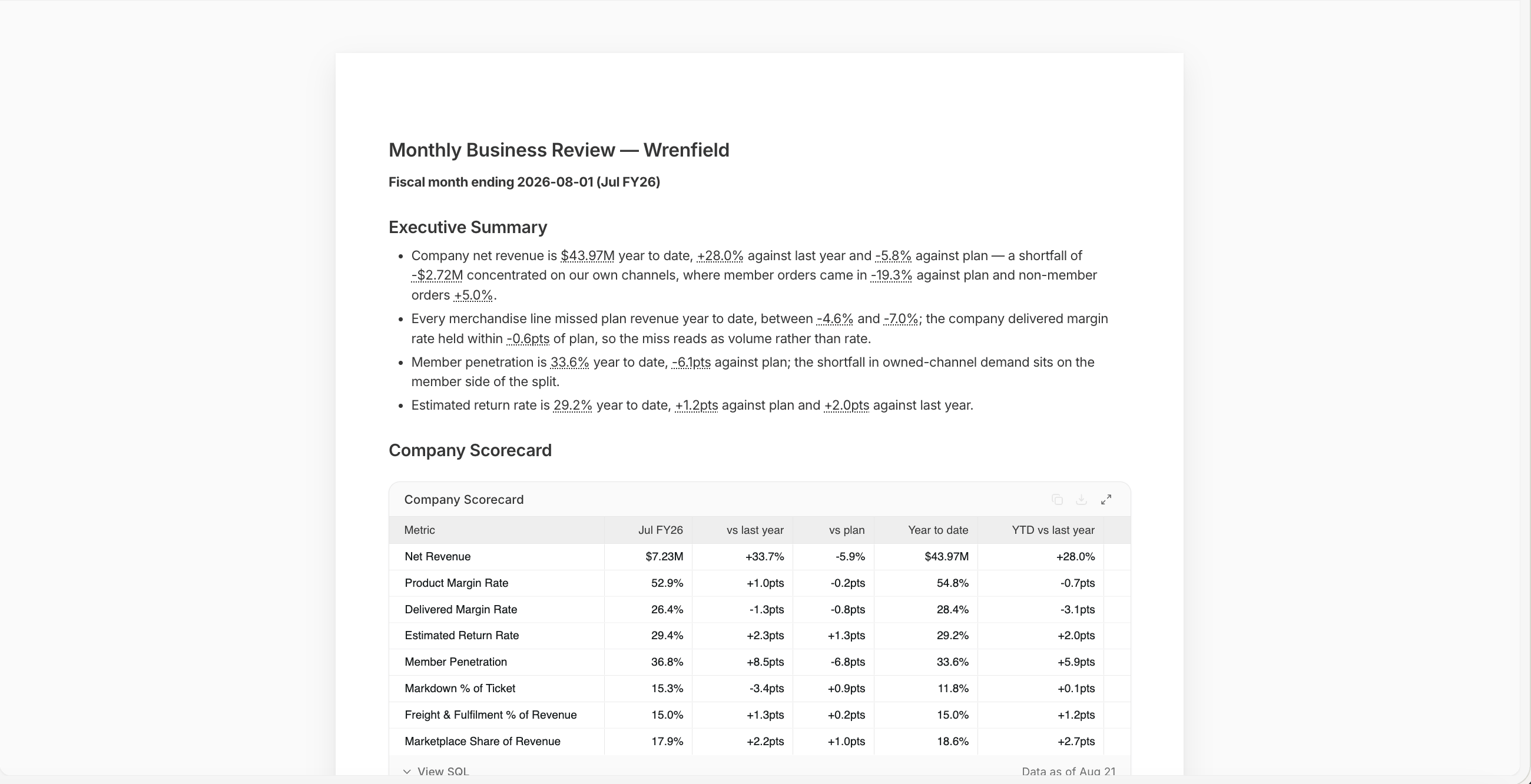
MBR executive summary and company scorecard
- Summary: Up to five bullets carry the month and the year to date. The first one is the finding
- Company scorecard: Eight metrics for the month and year to date, against plan and last year, with both margin tiers on the table. Two or three notes underneath say what moved
- Segment landscape: Revenue, growth, margin rate and variance for each line, with one sentence on what makes that line different from the others. The table stops at delivered margin, because below it cost is allocated rather than measured
- Deep dive: One or two sections on whatever moved the most money this month: a revenue shortfall, a margin walk, a returns step, a channel shift. The heading is written from what the numbers showed
- The paid product: Members, fee revenue, and how a member’s order compares to a non-member’s, every month, whether the numbers are loud or quiet
- Forward view and initiatives: Where the year lands against plan, and the initiatives in flight mapped to the findings they respond to
How it works
Addison takes you through a guided setup:- Data: Addison finds the last closed month and confirms how your business defines closed, along with which numbers arrive late
- Metrics: It suggests eight metrics, using your business’s own names for each margin tier
- Focus: Every candidate is sized in dollars, and the one or two that deserve the deep dive are suggested
- Build and verify: Summation writes the review, then runs verification: cited figures against their source queries, and the claims, comparisons and trends in the writing against the data behind them. A report is always verified before it reaches you, and a check Addison cannot resolve is surfaced as a decision for you rather than reported as a pass
- Send: Save it as a Playbook and schedule a Workflow to run it after each close. Every run verifies the new month’s review before it goes out
What you need
Connect your warehouse to keep the review current, or upload an Excel or .csv to run it now.
Make it yours
Keep your metric definitions and fiscal calendar in Knowledge so every review uses them. To change a paragraph, highlight it and use Edit with AI; remember to refresh verification before sharing. To save a correction for future runs, ask Addison to add to knowledge. Version history keeps every run.Try it
In Summation:- Use the setup skill:
/monthly-business-review - Or follow the guided setup: Get started → Choose a ready-made job → Prepare a monthly business review → Explore demo → Create with my data
Next
Reports
How a report is built, cited, and edited.
Verification
How Summation checks accuracy before you share.
Playbooks
Save the instructions so a run repeats exactly.
Workflows
Add a schedule and deliver by email or Slack.