
When to use it
Every team has someone who builds this on Monday morning. They pull the numbers, compare them to plan, find what moved, and write it up before the meeting. The writing alone takes twenty minutes. Finding the one number that explains the week takes the rest of the morning. A weekly review should answer one question: what changed since last week, and what are we doing about it? The person who owns the number should get the answer in five minutes. That’s the spec. Summation builds it every week, on your time.Understanding the demo
When you delegate your WBR to Summation, you get the same two-page format every week. It opens with no more than five executive-summary bullets, elevating the most important information from your organizational data.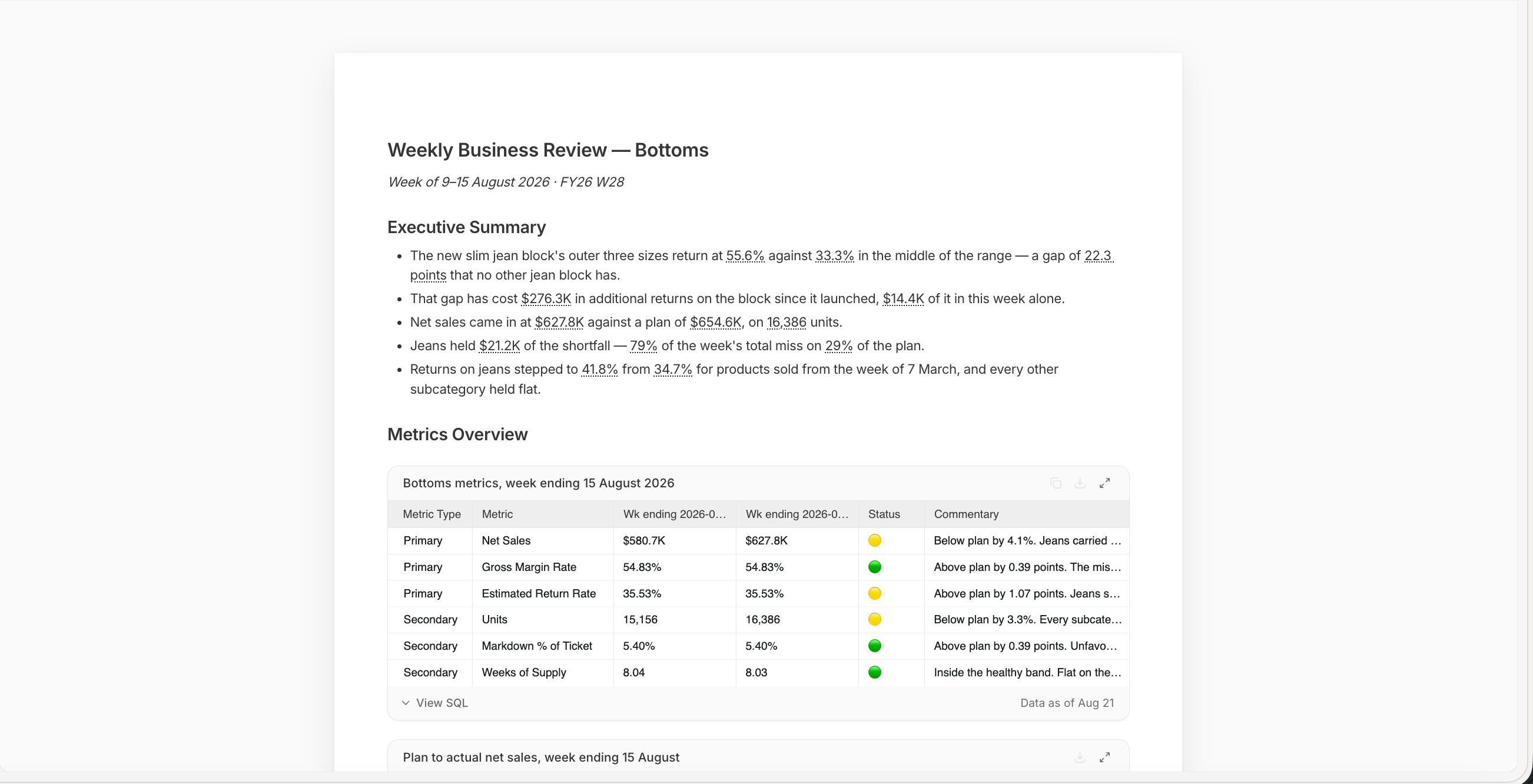
Weekly business review, page one
- Summary: Up to five bullets explain what changed, why it matters, and what needs attention
- Metric scorecard: Six core metrics compare the current week with the prior week and plan, with a status and short note for each. A bridge shows what contributed most to the gap between plan and actual results
- Highlights and lowlights: Up to three of each explain the most important positive and negative changes, and say when the cause is still unclear
- Largest shortfall: A focused analysis sizes the biggest gap, explores likely drivers one dimension at a time, and draws only conclusions supported by the data
- Upcoming initiatives: One or two relevant items from the initiative calendar provide context for what happens next
How it works
Addison takes you through a guided setup:- Data: Addison shows which tables it will use, and finds the reporting week from the dates in your data
- Metrics: It suggests six metrics, each with its target and direction
- Focus: Once the queries run, the changes are ranked by dollar impact and the biggest one is suggested for a closer look
- Build and verify: Summation writes the review, then runs verification on it. Reports are always verified before Addison hands one over: every cited figure is checked against the query that produced it, and every written claim against the data behind it. The shield badge in the toolbar carries the result, and the Verification Hub lists each check
- Send: Save the review as a Playbook and schedule a Workflow to deliver it weekly. Each run rebuilds the review and verifies it again against that week’s data
What you need
Connect your warehouse to keep the review current, or upload an Excel or .csv to run it now.
Make it yours
Keep your definitions in Knowledge so they stay consistent across every review. To change a paragraph, highlight it and use Edit with AI; remember to refresh verification before sharing. To save a correction for future runs, ask Addison to add to knowledge. Scheduled Workflows continue using their current version until you activate an update.Try it
In Summation:- Use the setup skill:
/weekly-business-review - Or follow the guided setup: Get started → Choose a ready-made job → Prepare a weekly business review → Explore demo → Create with my data
Next
Reports
How a report is built, cited, and edited.
Verification
How Summation checks accuracy before you share.
Playbooks
Save the instructions so a run repeats exactly.
Workflows
Add a schedule and deliver by email or Slack.